Showing posts with label wedding photography. Show all posts
Showing posts with label wedding photography. Show all posts
Friday, January 4, 2008
New Photo Contest!
Another Photo Contest at Wedding Photography Project. This time you can win a $1000 shopping cart system!


Thursday, May 24, 2007
Advice for aspiring photographers...
I was recently asked what advice I would give photographers just starting out. As you have probably figured out, I like lists, so here's a list of my advice!
- Follow your passion. Shoot in a the way that you like and inspires you. Don't get caught in the trap of "the way things should be done."
- Be yourself. No matter how much you like a particular website, a person's work, their choice in music, or the clever way they wrote their "About me" page, DON'T COPY IT. Being inspired to a better level is good, but be yourself.
- Learn about light and learn how to see light.
- Don't be afraid to screw up. I throw out 3 out of every 4 images I shoot. I make mistakes on purpose just to see if I might get something cool.
- Learn the "rules" of composition. Sometimes they help to make things interesting. Other times, just throw them out the window to try something interesting.
- Be a good business person. If you have trouble with some aspect of business - reading a profit and loss report, marketing, or anything else - figure out how to do it better. Whether that is by reading a book, finding a mentor, or hiring someone that does that well.
- Show people what you want them to hire you to do. If you love to do traditional portraiture, show books and images that highlight that. If you don't care if you ever do another family group photo, why have an album filled with them?
- Backup gear is important.
Wednesday, May 23, 2007
Gearbox!
I quite often get questions about what kind of gear I use. I'll happily tell you all, but first I have to get on my soapbox.
The most important piece of gear you will ever have in photography, is the gray thing sloshing around in your noggin! Gear is just a means to an end. Great photographers can create great images with cheap gear and horrible photographers can buy all the gear they want and it won't make any difference!
Here is the gear I use at almost every wedding:
-Canon 30D & 20D cameras
-Tokina 12-24 f4
-Canon 17-55 f2.8 IS
-Canon 50 f1.4
-Canon 85 f1.8
-Sigma 70-200 2.8 HSM
-Pocketwizards
-Canon 550EX x2
-Canon 580EX
-Lightstand
I have a whole bunch of other stuff that I sometimes use, but this makes my main kit.
The most important piece of gear you will ever have in photography, is the gray thing sloshing around in your noggin! Gear is just a means to an end. Great photographers can create great images with cheap gear and horrible photographers can buy all the gear they want and it won't make any difference!
Here is the gear I use at almost every wedding:
-Canon 30D & 20D cameras
-Tokina 12-24 f4
-Canon 17-55 f2.8 IS
-Canon 50 f1.4
-Canon 85 f1.8
-Sigma 70-200 2.8 HSM
-Pocketwizards
-Canon 550EX x2
-Canon 580EX
-Lightstand
I have a whole bunch of other stuff that I sometimes use, but this makes my main kit.
Monday, April 30, 2007
"Hey, Cory! Why is your flash sideways?" AKA, The Bounce Flash Article!
I am finally getting started on my series of articles on flash. I am going to start with the type of flash I use most often - the on-camera bounce.
The reasons I use on-camera bounce:
The reasons NOT to use bounce flash
Equipment that you will need.
Okay, here we go with the meat of the article.
Bounce flash is a quick and easy way to upgrade the lighting in a room. Whenever I am looking through my camera I am looking at the type and angle of light as well as content and composition. When I see that the lighting is mostly from overhead sources, I usually want to modify it somehow. Overhead lighting as the only source of light leaves dark shadows in the eyes and causes people to look tired. This is probably my least favorite type of lighting.
To use bounce flash, you don't have to do anything too difficult. You attach your flash to your camera (or to an off-camera shoe cord if you wanna get funky) and point the flash in the direction that you want the light to come from. Imagine that you have a big softbox on a set of wheels that you can position anywhere you want in the half-circle behind you. You can place directly to the left or right, directly overhead, directly behind you or the the left or right of directly behind. You obviously can't make it come from the far side of your subject because of the physics involved (think of shooting a cue ball in pool - you can't bounce the ball off the bumper directly on the far side of another ball without hitting the ball).

Now that you have your flash bouncing around the room, you need to control it a bit. The first thing to keep in mind is how you want the lighting to appear. Do you want to drown out the existing lighting, add to the existing lighting or somewhere in between? My favorite way to do it is to add to, but not completely overpower the existing lighting. I do this by manually setting the exposure to keep the room lighting the way I want it (to add to, but not completely overpower, I might set the exposure to underexpose the existing light by one to two stops). Also, the slower your shutter speed, the more you have to have the room lighting below the flash setting. To give you an example, if you are shooting at 1/20 of a second with only a one-stop difference between room light and flash, you will have blur from the movement of the people as recorded by the by room lighting after the flash has fired. In which case, you need to increase the difference to two stops to avoid the flash-blur look. Unless, of course, that is what you are going for!

Bounce from the right of the room balanced to the room light.
Something else that I wold recommend is controlling the light from falling directly into the frame (this is a more common problem when shooting wide). To do this, you either need to zoom your flash or create some sort of snoot-type device for your flash. You can see what I did here with a piece of black plastic (a file folder from Staples) and some Velcro. This prevents flash from hitting someone directly into the scene I am shooting. I've shown it to other people, but most don't share my enthusiasm for attaching ugly, home-made devices to their flashes, but willingly spend $40 on a piece of Tupperware to sit on top of it!

My setup with black plastic "bounce tunnel"!
I have four more hints with bounce flash. The first is to use a high ISO because this increases the sensitivity of the sensor, which in turn reduces how hard your flash has to work and reduces how badly you blind anyone that makes the mistake of standing next to you! Second, buy a good pair ofNiMH batteries. NiMH batteries keep a consistent recharge rate during the life of the batteries. With Alkaline batteries, the recycle times on your flash become longer and longer as the power is drained out of them. Third, be aware of your surroundings. It doesn't do any good to want the light to come from the left if the nearest wall is 120 feet away. It also doesn't do any good to point a flash directly at the mother of the bride's face! No matter how annoying you may find her, nothing good will come of blinding her! That last is just a joke; I haven't had an annoying MOB in years.

Finally, experimentation is good! In fact, it is the only way to get a good handle on using bounce flash. Go forth and bounce!
The reasons I use on-camera bounce:
- I move quickly and quite often have the two options of available light or on-camera flash. Sometimes the available light in a room is not flattering.
- I don't like direct on-camera flash in MOST situations as it produces very flat lighting with harsh shadows
- Soft, bounced lighting, when balanced with room lighting, looks natural and flattering.
The reasons NOT to use bounce flash
- Some rooms don't lend themselves well to bounce flash (ballrooms a mile wide with 40 foot ceilings, black paint on the walls, red paint on the walls if you are shootingJPG, etc.)
- It does not add any drama to the photographs (harsh lighting is dramatic and can add or detract from a photograph, soft lighting usually does neither).
- Beautiful natural lighting already exists in the environment you are in.
Equipment that you will need.
- A digital (or film, I suppose) SLR
- Flash capable of tilt and swivel.
- A piece of black plastic and some Velcro.
- Good batteries
Okay, here we go with the meat of the article.
Bounce flash is a quick and easy way to upgrade the lighting in a room. Whenever I am looking through my camera I am looking at the type and angle of light as well as content and composition. When I see that the lighting is mostly from overhead sources, I usually want to modify it somehow. Overhead lighting as the only source of light leaves dark shadows in the eyes and causes people to look tired. This is probably my least favorite type of lighting.
To use bounce flash, you don't have to do anything too difficult. You attach your flash to your camera (or to an off-camera shoe cord if you wanna get funky) and point the flash in the direction that you want the light to come from. Imagine that you have a big softbox on a set of wheels that you can position anywhere you want in the half-circle behind you. You can place directly to the left or right, directly overhead, directly behind you or the the left or right of directly behind. You obviously can't make it come from the far side of your subject because of the physics involved (think of shooting a cue ball in pool - you can't bounce the ball off the bumper directly on the far side of another ball without hitting the ball).

The softbox concept
 A portrait on the fly using bounce flash
 A portrait on the fly using bounce flash
Now that you have your flash bouncing around the room, you need to control it a bit. The first thing to keep in mind is how you want the lighting to appear. Do you want to drown out the existing lighting, add to the existing lighting or somewhere in between? My favorite way to do it is to add to, but not completely overpower the existing lighting. I do this by manually setting the exposure to keep the room lighting the way I want it (to add to, but not completely overpower, I might set the exposure to underexpose the existing light by one to two stops). Also, the slower your shutter speed, the more you have to have the room lighting below the flash setting. To give you an example, if you are shooting at 1/20 of a second with only a one-stop difference between room light and flash, you will have blur from the movement of the people as recorded by the by room lighting after the flash has fired. In which case, you need to increase the difference to two stops to avoid the flash-blur look. Unless, of course, that is what you are going for!

Bounce from the right of the room balanced to the room light.
Something else that I wold recommend is controlling the light from falling directly into the frame (this is a more common problem when shooting wide). To do this, you either need to zoom your flash or create some sort of snoot-type device for your flash. You can see what I did here with a piece of black plastic (a file folder from Staples) and some Velcro. This prevents flash from hitting someone directly into the scene I am shooting. I've shown it to other people, but most don't share my enthusiasm for attaching ugly, home-made devices to their flashes, but willingly spend $40 on a piece of Tupperware to sit on top of it!

My setup with black plastic "bounce tunnel"!
I have four more hints with bounce flash. The first is to use a high ISO because this increases the sensitivity of the sensor, which in turn reduces how hard your flash has to work and reduces how badly you blind anyone that makes the mistake of standing next to you! Second, buy a good pair ofNiMH batteries. NiMH batteries keep a consistent recharge rate during the life of the batteries. With Alkaline batteries, the recycle times on your flash become longer and longer as the power is drained out of them. Third, be aware of your surroundings. It doesn't do any good to want the light to come from the left if the nearest wall is 120 feet away. It also doesn't do any good to point a flash directly at the mother of the bride's face! No matter how annoying you may find her, nothing good will come of blinding her! That last is just a joke; I haven't had an annoying MOB in years.

Another example of side bounce.
Finally, experimentation is good! In fact, it is the only way to get a good handle on using bounce flash. Go forth and bounce!
Sunday, April 29, 2007
The workflow
I sometimes get asked what my workflow is like. So, here is a quick sketch!
1) Shoot the wedding in RAW
2) Download the cards using Downloader Pro by Breezebrowser and a Sandisk Extreme USB 2.0 Card reader to an external drive
3) Renumber images using Breezebrowser
4) Burn 2 copy discs of RAW images to DVD using Nero
5) Import into LightRoom
6) My wife picks images from 3000 to 700 using LR flag feature
7) Process picked images using LR
8) Export JPG's
9) Check the JPG's using Breezebrowser fix anything that needs to be fixed in Photoshop
10) Renumber the JPG's using Breezebrowser
11) Burn three copies of the final JPG's - one for client, two for my files
12) Jettison the RAW images (still have the backups)
13) Run RedCart script in Photoshop
14) Upload Cart
15) Choose favorite images for Slideshow
16) Size images for proofing section of website using Breezebrowser
17) Upload slideshow images to website
18) Size all images for proofing and add border with Breezebrowser
19) FTP proof images to ProDPI\
20) Select best of best for blog, size & post
1) Shoot the wedding in RAW
2) Download the cards using Downloader Pro by Breezebrowser and a Sandisk Extreme USB 2.0 Card reader to an external drive
3) Renumber images using Breezebrowser
4) Burn 2 copy discs of RAW images to DVD using Nero
5) Import into LightRoom
6) My wife picks images from 3000 to 700 using LR flag feature
7) Process picked images using LR
8) Export JPG's
9) Check the JPG's using Breezebrowser fix anything that needs to be fixed in Photoshop
10) Renumber the JPG's using Breezebrowser
11) Burn three copies of the final JPG's - one for client, two for my files
12) Jettison the RAW images (still have the backups)
13) Run RedCart script in Photoshop
14) Upload Cart
15) Choose favorite images for Slideshow
16) Size images for proofing section of website using Breezebrowser
17) Upload slideshow images to website
18) Size all images for proofing and add border with Breezebrowser
19) FTP proof images to ProDPI\
20) Select best of best for blog, size & post
Wednesday, April 25, 2007
Creating an Image (for your business)
One of my most common questions from other photographers is about advertising to get the clients you want. To me, this is putting the cart before the horse.
When you are creating a business, I believe that you have to start with an idea of what your business personality will be. To get this, I think you start with your own personality on your best day or what you strive for your personality to be. This could be "Like me, only more attentive to detail." Then start describing that person/business in single words.
Sophisticated, Down-to-Earth, Confident, Real, Sweet, Intriguing, Mysterious, Responsible, Trustworthy, Fun, Sarcastic, and Unique could be words to describe yourself and your business. Choose what you think are the two most important words, add in a short description of the work you do, and add the clientèle you wish to serve.
When you add it all up, you will end up with a statement that completely describes your business.
Once you have all of the ideas and materials in place, then it is time to market your business aggressively, whether you do that by advertising, networking, or word-of-mouth depends on your target market (that you just identified) and personality!
When you are creating a business, I believe that you have to start with an idea of what your business personality will be. To get this, I think you start with your own personality on your best day or what you strive for your personality to be. This could be "Like me, only more attentive to detail." Then start describing that person/business in single words.
Sophisticated, Down-to-Earth, Confident, Real, Sweet, Intriguing, Mysterious, Responsible, Trustworthy, Fun, Sarcastic, and Unique could be words to describe yourself and your business. Choose what you think are the two most important words, add in a short description of the work you do, and add the clientèle you wish to serve.
When you add it all up, you will end up with a statement that completely describes your business.
Cory Parris is a fun, relaxed and attentive photographer that creates beautifully elegant photostories for brides and grooms that put photography on the top of their priority list for both importance and budget.This does not have to be difficult and it can change over time, so don't agonize over it. However, you now have a statement that you can pull apart and use for your marketing, creating your business plan (whether it is on paper or just in your head), and for guiding your creation of business image products such as your business cards, letterhead, brochures, logo and, most importantly, your website.
Once you have all of the ideas and materials in place, then it is time to market your business aggressively, whether you do that by advertising, networking, or word-of-mouth depends on your target market (that you just identified) and personality!
Wednesday, April 11, 2007
Cool Camera Bag!

My friend Jim Garner has come out with a new camera bag. This is a wedding shooter that designed the perfect bag for a wedding shooter. Check it out at GoBoda.
Wednesday, March 14, 2007
Direction and Quality of Light
I was going to start writing my articles on flash today, but I thought that as a prologue, I would first talk about the quality and direction of light.
Light, in my mind, has two characteristics. Direction and Quality. Light can surround you almost perfectly even from every direction, or it can stream harshly from one direction. It can be soft or it can be harsh. It can have these traits whether you are using natural light or creating the light with flash (this is why this article came first).
Light can be soft, harsh, directional or enveloping. I've grabbed some examples from my latest wedding to illustrate and show you how I use the different light qualities.
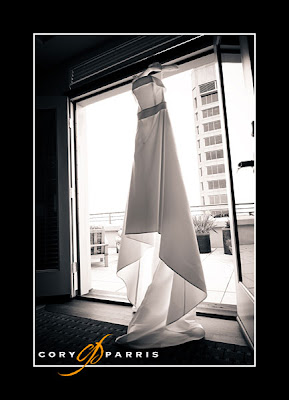
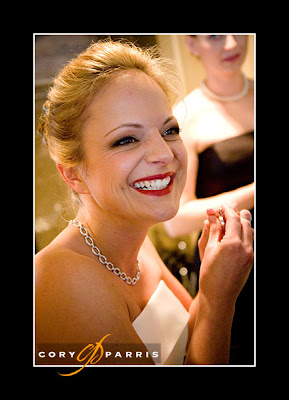
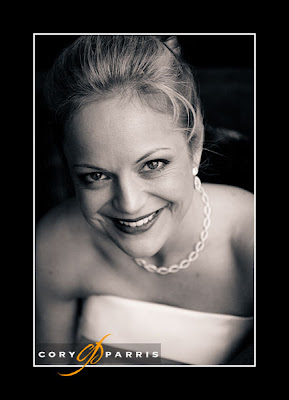
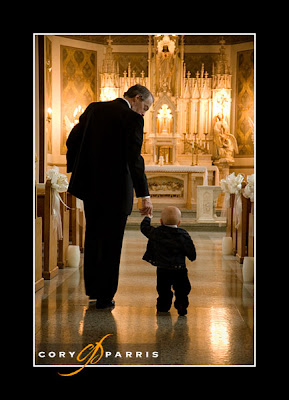
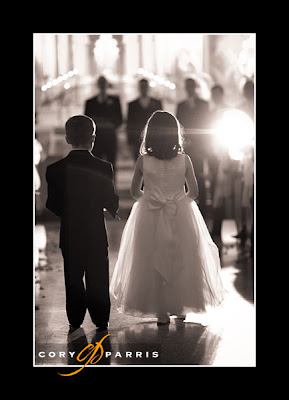
As the ring bearer and flower girl were walking down the aisle, I was luck enough to capture the harsh, directional light of Grandma's flash, which backlit them beautifully.
Light, in my mind, has two characteristics. Direction and Quality. Light can surround you almost perfectly even from every direction, or it can stream harshly from one direction. It can be soft or it can be harsh. It can have these traits whether you are using natural light or creating the light with flash (this is why this article came first).
Light can be soft, harsh, directional or enveloping. I've grabbed some examples from my latest wedding to illustrate and show you how I use the different light qualities.

Natural, soft window light streaming in the door. I chose to backlight the dress so that the light would shine through it.

This was taken with available light in the room. This was less of a conscious choice and more of grabbing a moment with the current equipment.

I placed Kellie near the window to get the soft, very directional light on her face.

Available light in the chapel.

As the ring bearer and flower girl were walking down the aisle, I was luck enough to capture the harsh, directional light of Grandma's flash, which backlit them beautifully.

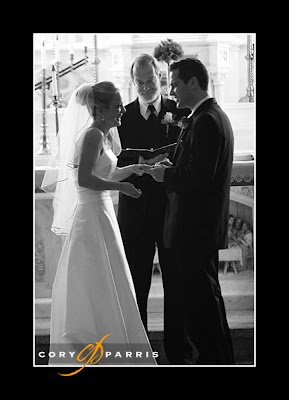
Again, using the available light (actually more available darkness). The alter was lit, but the rest of the room had only candles for illumination causing the couple to be severely backlit.

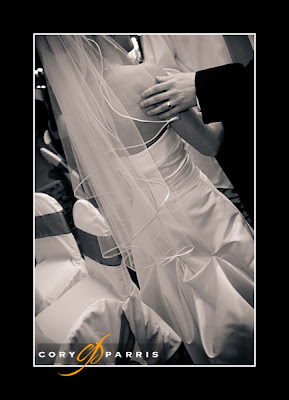
The soft, enveloping lighting of a bounced flash.

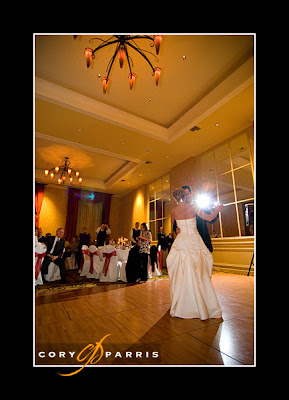
This image is the result of two flashes. One on a lightstand creating the main exposure and backlighting the couple, and one on camera at one stop below the exposure to illuminate the near side of the couple.

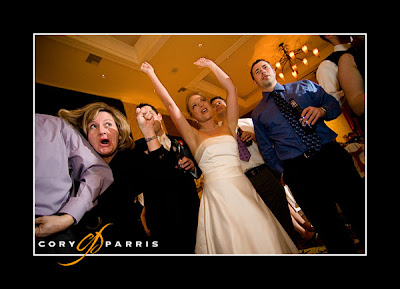
This image is during the college fight song, with the off-camera flash creating the main exposure (and harsh directional lighting) and the on-camera at one stop below filling in the shadows and making the effect less harsh.

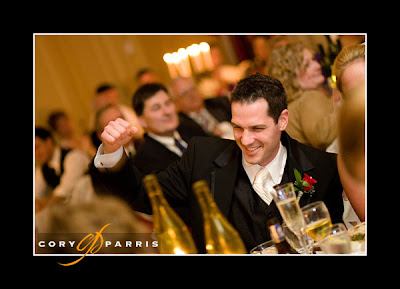
The final image of David's fist-pump is again the soft, enveloping, directional (from the right and above) light of bounce flash.
Monday, March 12, 2007
The Wedding Photography Project!
Most of you probably already know that I run another website that features articles written by photographers other than myself at the Wedding Photography Project. There are two new articles there by Jeff Lazo of ProDPI lab talking about printing, and an excellent article by Neil van Niekerk about balancing flash with fireworks. Great stuff!
Tuesday, February 27, 2007
Flashin' for the fun of it!
On camera flash is at once over-rated and over-maligned. It is one of the most versatile and empowering tools in a photographer's bag. Over the next couple of weeks I'm going to write a series of articles about lovin the flash!
Here is a quick overview of what I will be discussing.
Here is a quick overview of what I will be discussing.
Hey, Cory! Why is your flash sideways?


Quick Group Portrait Lighting for the PJ Wedding Shooter

Dynamic Lighting Using Off-Camera Flash

Flashin' in the Sun


Quick Group Portrait Lighting for the PJ Wedding Shooter

Dynamic Lighting Using Off-Camera Flash

Flashin' in the Sun

Friday, February 16, 2007
The steps to a photography business - the short version!
Start by taking stock of what you have and what your goals are. What are your assets? Money, time, etc. How are your images? Fantastic, needs work, true beginner. Where do you want to be in 1 year? 3 years? 5 years?
My answers would go in this order:
1) Get what you need in the way of equipment to produce good work. This does not need to be the flashiest of gear (a 50 1.8 or 35 f2 could be a big improvement in creating a "different" look on the cheap as would a 85 1.8). A vivitar flash and some pocket wizards (or generic alternative) can create dramatic results in the right hands as Zach Arias has often shown. Also get something wide (20mm on 5d or a 12-24 f4 tokina on a crop camera) to add drama and see things a different way. With a couple of these suggestions, you can be producing a wide variety of different looks and have spent less than $1000. It also works as a backup strategy if something breaks.
2) Educate yourself in creating amazing images. One Light is a good place to start. As is the usual $100 Denis Reggie tour, or if Huy is doing a short course in your area. There are also many online resources. Second shooting for great shooters would work very well.
3) Once you know how to take amazing images, are inspired, well-equipped to take advantage of the opportunities you have or will get, and have a website capable of showing off your work in a up-scale, stylish way, then you can pour some money into advertising.
It is hard to work up a buzz as an average photographer, so educate yourself, equip yourself, produce some excellent work, THEN attack the marketplace. Spending money on advertising before you are ready is just wasting money. Getting yourself in position to attack the marketplace makes more sense.
What you have in the way of assets (namely time and money) will determine your strategy for the attack and the timetable involved. If you have more money than time (full time well-paying job and a family for example), spend the money on the best possible samples and advertise in the biggest, splashiest places. If your assets are more on the time side (part time working bachelor), then you might get a couple nice samples and try to get your name out by meeting everyone that will meet with you (florists, planners, venue coordinators, other photographers, etc.).
My answers would go in this order:
1) Get what you need in the way of equipment to produce good work. This does not need to be the flashiest of gear (a 50 1.8 or 35 f2 could be a big improvement in creating a "different" look on the cheap as would a 85 1.8). A vivitar flash and some pocket wizards (or generic alternative) can create dramatic results in the right hands as Zach Arias has often shown. Also get something wide (20mm on 5d or a 12-24 f4 tokina on a crop camera) to add drama and see things a different way. With a couple of these suggestions, you can be producing a wide variety of different looks and have spent less than $1000. It also works as a backup strategy if something breaks.
2) Educate yourself in creating amazing images. One Light is a good place to start. As is the usual $100 Denis Reggie tour, or if Huy is doing a short course in your area. There are also many online resources. Second shooting for great shooters would work very well.
3) Once you know how to take amazing images, are inspired, well-equipped to take advantage of the opportunities you have or will get, and have a website capable of showing off your work in a up-scale, stylish way, then you can pour some money into advertising.
It is hard to work up a buzz as an average photographer, so educate yourself, equip yourself, produce some excellent work, THEN attack the marketplace. Spending money on advertising before you are ready is just wasting money. Getting yourself in position to attack the marketplace makes more sense.
What you have in the way of assets (namely time and money) will determine your strategy for the attack and the timetable involved. If you have more money than time (full time well-paying job and a family for example), spend the money on the best possible samples and advertise in the biggest, splashiest places. If your assets are more on the time side (part time working bachelor), then you might get a couple nice samples and try to get your name out by meeting everyone that will meet with you (florists, planners, venue coordinators, other photographers, etc.).
Choosing the right flash batteries
Here's a little detail that people rarely think or talk about. What type of batteries should you be using in your flash?
There are basically four options: alkaline, nimh, ni-cad, and external packs.
Alkaline batteries are the easiest to use because they are everywhere (and costco sells packs of 40 AA's for around $10). However, they are disposable causing hazardous waste, and they are not the best performers. When they are brand new, they work well. As the charge gets sucked out by the flash, the recycle times gradually get longer and longer, forcing you to wait between shooting exposures.
Ni-Cads have been around forever. They are relatively cheap, rechargeable, and produce faster recycle times. However, they don't hold as much of a charge, so you end up changing them more often and requiring you to bring a slew of batteries with you. They are also memory-type batteries. That means you have to fully discharge them before charging them again. You can buy the more expensive chargers that will discharge the batteries before charging, or just fire your flash until they are completely spent.
Nimh batteries are my choice. They are not too expensive ($20 for a set and a charger), hold a ton of energy (so you don't have to suddenly change batteries in the middle of the toast), and recycle at a quick, consistant rate until they are nearly completely spent. They are also memory-free so you can recharge them anytime without ruining the batteries.
External battery packs provide the most power and quickest recharge times. However, they also require extra cords and extra weight. For the right situation, and for some people this provides the best option. Personally, I hate cords on my cameras when I am shooting.
There are basically four options: alkaline, nimh, ni-cad, and external packs.
Alkaline batteries are the easiest to use because they are everywhere (and costco sells packs of 40 AA's for around $10). However, they are disposable causing hazardous waste, and they are not the best performers. When they are brand new, they work well. As the charge gets sucked out by the flash, the recycle times gradually get longer and longer, forcing you to wait between shooting exposures.
Ni-Cads have been around forever. They are relatively cheap, rechargeable, and produce faster recycle times. However, they don't hold as much of a charge, so you end up changing them more often and requiring you to bring a slew of batteries with you. They are also memory-type batteries. That means you have to fully discharge them before charging them again. You can buy the more expensive chargers that will discharge the batteries before charging, or just fire your flash until they are completely spent.
Nimh batteries are my choice. They are not too expensive ($20 for a set and a charger), hold a ton of energy (so you don't have to suddenly change batteries in the middle of the toast), and recycle at a quick, consistant rate until they are nearly completely spent. They are also memory-free so you can recharge them anytime without ruining the batteries.
External battery packs provide the most power and quickest recharge times. However, they also require extra cords and extra weight. For the right situation, and for some people this provides the best option. Personally, I hate cords on my cameras when I am shooting.
Wednesday, February 14, 2007
Happy Valentine's! And a b&w conversion for Photoshop
Hey gang. I hope you have a fantastic holiday with your loved ones!
Today I'm going to show you how to make a really fast, simple, high-contrast black & white conversion.
The first step is to make sure that you have the default black on white color set.
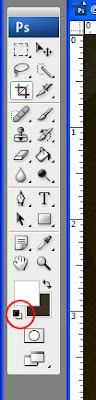 Then go the the layers palette and click on the adjustment layers symbol.
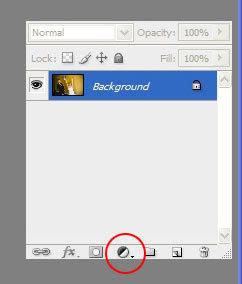
The third and final step is to choose the "Gradient Map" option.
All Done. Here is a before and after.
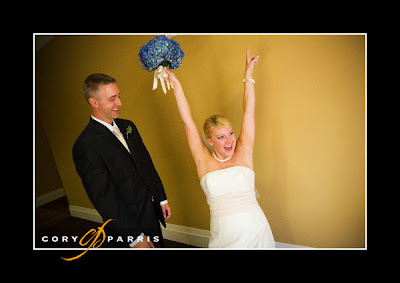
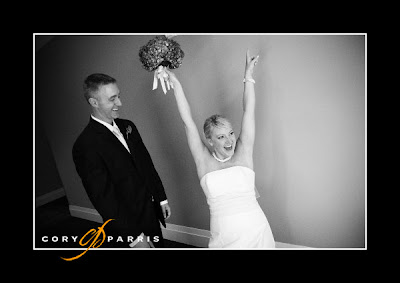
Today I'm going to show you how to make a really fast, simple, high-contrast black & white conversion.
The first step is to make sure that you have the default black on white color set.
 Then go the the layers palette and click on the adjustment layers symbol.
The third and final step is to choose the "Gradient Map" option.
All Done. Here is a before and after.


Tuesday, February 13, 2007
Monday, February 12, 2007
Where should I get prints made?
One of the hardest things to find is a good lab to make prints for you. My suggestions are MPix for amateurs and ProDPI for advanced amateurs and professionals that have a "managed workflow". MPix provides good color, will make adjustments for you and deliver them to your door for a reasonable price. ProDPI is nearly the perfect lab for me as a professional. Color is excellent, consistant, on the photographic paper I prefer (Fuji), extremely fast and good prices. ProDPI also has the best customer service that I've received from any lab.
Wedding Biz - Shooting!
When I shoot a wedding, I only partially shoot for my client. It sounds crazy since they are spending thousands of dollars to have me there, but it's true.
My main goal when I photograph a wedding is to create what I think is the greatest wedding photographs I have ever created. I do this for me. It is my tastes that I am working with. My satisfaction and approval that I am looking for. My creative drive that I am trying to satisfy. My personal comfort zone that I am stretching, and leaving behind in my effort to create great images.
I am also shooting to create great images to put into my portfolio so I can sell my services to my next bride. I also shoot to add images to the portfolios of the florist, cake artist, venue, wedding coordinator, and band.
As a side benefit, trying to stretch creatively, create amazing work, and putting images into my future portfolio also ends up by delivering some great images for the client that I'm working for! As bizarre as it sounds, my business has increased exponentially by trying to satisfy myself rather than my clients!

My main goal when I photograph a wedding is to create what I think is the greatest wedding photographs I have ever created. I do this for me. It is my tastes that I am working with. My satisfaction and approval that I am looking for. My creative drive that I am trying to satisfy. My personal comfort zone that I am stretching, and leaving behind in my effort to create great images.
I am also shooting to create great images to put into my portfolio so I can sell my services to my next bride. I also shoot to add images to the portfolios of the florist, cake artist, venue, wedding coordinator, and band.
As a side benefit, trying to stretch creatively, create amazing work, and putting images into my future portfolio also ends up by delivering some great images for the client that I'm working for! As bizarre as it sounds, my business has increased exponentially by trying to satisfy myself rather than my clients!

This image was taken during the daylight with flash as the main source of light on the couple. They were extremely backlit, so I set the exposure for the background slightly underexposed to give the darker blue sky and used the flash as the main light. This was something I had wanted to try, but hadn't much until this photograph earlier this year. Now I've done it several times. The couple loved the shot. Bonus!Go forth and produce the images you want. The clients that like those images will love you for it!
Getting the Clients You Want
When you are shooting, whom are you shooting for? Are you creating images you think will sell, or are you shooting to get the clients you want?
About four years ago, I stopped trying to shoot what I thought my current the clients wanted to buy and started creating images that were more representative of what I wanted my portfolio to look like in the future. This is a very important difference in the way I was approaching wedding photography.
As a result of my new mindset, my work improved, my clients’ satisfaction levels went through the roof and most importantly, I was much happier.
The second part of this is only showing the things you want to sell. Don’t show what you think your clients want to see. Show what you love to do and what you excel at. I stopped showing any group portraits on my site or in my sample books.
Eventually, I started to find new, different clients from my old clientele. They wanted what I was showing, were eager to have me at their wedding, and were willing to pay more for it.
This goes for everything you show. Use the albums that you love. Show the wall samples like you want them to buy. Print up postcards that show your favorite image, not the one you think will be the best seller. Unlike with other businesses, if you captured one percent of the market, you would be overloaded, so what we, as photographers, are trying to do is find the RIGHT clients, rather than just any clients.
Cory Parris is wedding photographer in Seattle, Washington. He loves his wife, his kids, owning his own business, and photography. He is constantly mixing them together to see what he comes up with!
You can find Cory on the web at www.coryparris.com and here!
Speeding Up the Workflow
Improving Your CS2 RAW Workflow With Pre-sets
How is it that some photographers claim that they get done with their post-processing so fast? How do I do all my post-processing for 600 photographs in three hours?
Hey, I thought you’d never ask. The answer really is quite simple. Pre-sets in Bridge. This is also the same concept Adobe is using with their new Lightroom project. By using pre-sets, you can bypass the slow and tiresome Adobe Camera Raw (ACR) window.
The first step to working with Bridge is to set up your processing defaults. You can see that I have mine set up to do a lot of the work for me. I find that it is faster to let Bridge adjust the Exposure, Shadows, and Brightness automatically. I have White Balance, Hue, Contrast, and Saturation set to a specific value.
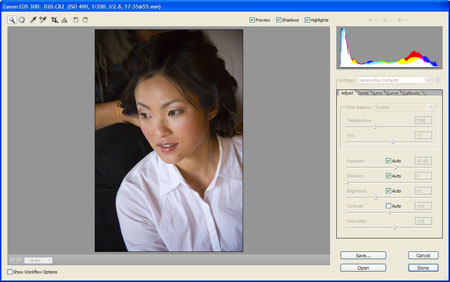
You will have to play with your setting until you get them perfected how you like them. A couple of tricks that I use is the lens correction tab to add a soft vignette to each images and I bump up the contrast and saturation to give it the pop that I love. Once you have it the way you like it, save the default setting by clicking the triangle just to the right of where it says Camera Raw Defaults and clicking "Save New Camera Raw Defaults". You will have to do this for each different camera model (5D, 30D, etc.) that you use.
Now, let's make sure the pre-sets we are about to use will show up when we want them to in Bridge. You will need to go to the Edit menu in Bridge and choose Preferences. Then click on the Advanced option in the list on the left. The screen below will show up (you may need to click on it to make it big enough to see). Make sure that you have the "Double click edits Camera Raw settings in Bridge" and "Use Distributed Cache When Possible" options are checked. This will make things work correctly.

Now that you have that done, you need to save some presets. Probably one of the first that you will want to set up is a b&w preset. It is possible to create some great b&w settings in bridge by desaturating and adjusting contrast. You can also use the calibrate tab to adjust the tones in the image in a way similar to using filters with black and white film. Once you have your recipe created, you need to save it by clicking the arrow just to the right of where it says Image Settings in the drop-down menu.
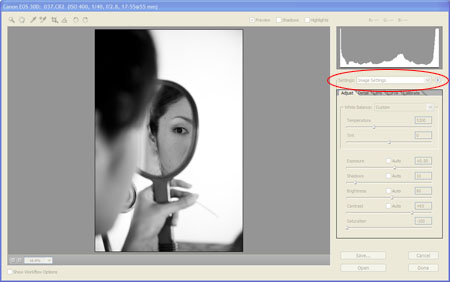
Choose the option Save Image Subset. When the next window pops up, choose only the check boxes that apply to the recipe that you want to save. In this case, it is saturation and contrast. 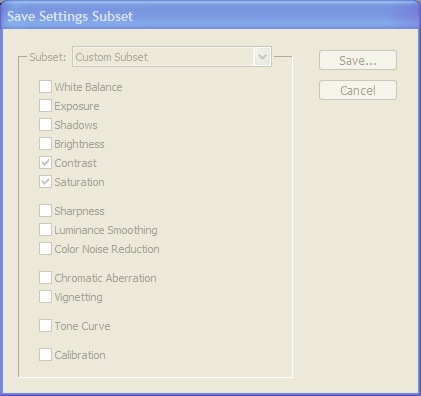
Click Save and give it a name that you will easily be able to recognize when you see it. For this one, you might try "B&W - Basic". That way you can keep all of your B&W actions together.
Now when you are in Bridge, you should be able to right click on any image thumbnail and see "B&W - Basic" as one of your options! Cool. Now repeat this process of saving presets for anything you normally do. I have them for exposure (-2.0, -1.5, -1.0, -0.5, -0.0, +0.5, etc.), brightness, contrast, curves, white balance, multiple b&w, a kind of cool sepia-ish muted color (true sepia is impossible to create in Bridge as far as I can tell), color pops, high contrast, and cross-process effects. And they are all point and click.
Another cool thing about this sort of processing is that the concepts and even some of the settings will be useable in Lightroom though you will have to go through the process of creating the presets again.
If you don't want to create your own presets, you can purchase them from Kevin Kubota and David Jay. Good luck and let me know how it goes!
Cory Parris is wedding photographer in Seattle, Washington. He loves his wife, his kids, owning his own business, and photography. He is constantly mixing them together to see what he comes up with!
You can find Cory on the web at www.coryparris.com and here!
Subscribe to:
Posts (Atom)